
Handling a Stuck Heroku Release Command (Maybe)
I am unsure how to title this post, but it feels like a good idea to share what happened so that you have some steps to follow if you are in a bit of a panic.
First, here is what happened. Earlier today, I deployed a change that would add a column to a table. There was no backfill on the column. There are no required indexes. Nothing. It’s a blank column on a relatively small (20k rows) table. I even held the code that would use this table for a second deployment.
Our Heroku deploys have been taking quite a while recently (15 minutes or so). I haven’t had time to dig into why yet, so I wasn’t overly concerned about the duration initially. Then I got the first ping that something was offline (Sidekiq error queue). That one felt unrelated. Our monitoring is set to notify us anytime the error queue has more than 100 items. Shortly after, I received notifications that other services were unavailable (timing out). A quick check on the recent deployment shows that the release phase has been running for 20 minutes.
At this point, I decide it is time to kill the deployment. I commnd+D the terminal and checked the current processes on Heroku (heroku ps). I can see the release command is still running. The next thing to check is the database. I can console into the database and other apps that use this same database are all functioning as expected. In addition, as far as I can tell, all the background jobs for this app are still running as expected (we use Sidekiq+Redis, but ultimately all work is done against the PG database).
To be safe, I ran pg:diagnose and could see long-running queries against the table I was attempting to migrate.
Next, I focused on killing the release phase process. In nearly 12 years of using Heroku, I have never had to kill a running process. I find references to ps:stop and ps:kill. Both report they worked, but running us ps, I can see the process is still running. It turns out that you need to include the process type as well: heroku ps:kill release.2343. Better output here would have been helpful.
While this killed the process, the app’s state did not improve. I restarted the processes, which again did not fix the problem. Finally, I figured something was off with the app state, so I rolled back to a previous update (note: the new deploy was never fully deployed and unavailable). This appeared to fix things for a few seconds, but everything on the main app again began to time out.
I checked heroku pg:diagnose again and could see the same long-running queries were still there. There were about 40 or so of them, but I couldn’t get the output in a state where I could quickly grab the PIDs to kill each process, so I went ahead and ran heroku pg: killall. After this, I restarted the main app (and related apps), and everything appears to be working well.
So the takeaways:
- Never deploy before coffee. The mind is not ready for this kind of stress.
- My best guess is that the connection pool for the main web app somehow got into a bad state. Killing all the connections, I was able to reset it.
I still have to deploy again, but I assume this was a freak condition.
Adding Execute Permission to Script in Git
With my SQLite backup script, I mentioned you need to add execute permission after you deploy.
However, I cloned a Rails app off of GitHub today and noticed that the bin/setup worked as expected and had proper execute permissions. 👀
I eventually found my way to the git’s update-index command:
Modifies the index. Each file mentioned is updated into the index and any unmerged or needs updating state is cleared.
That description is clear as mud. 😛
But digging further is this option: --chmod=(+|-)x
Set the execute permissions on the updated files.
So here is how to use it.
- Add a new script file or modify an executing one (even with just a comment). This is important because
update-indexwill not take effect unless you commit to some change. - Add the change to git:
git add bin/backup - Execute update-index: `git update-index –chmod=+x bin/backup
- Commit the change:
git commit -m "Now with execute permission"
Ruby Sub vs. Gsub
A little Ruby distinction I had not seen (or remembered seeing) before.
In Ruby, both String#sub and String#gsub are methods used for string substitution, but they have a subtle difference:
String#sub: This method performs a substitution based on a regular expression pattern, replacing only the first occurrence that matches the pattern.
|
|
Output: hella world
String#gsub: This method also performs a substitution based on a regular expression pattern, but it replaces all occurrences that match the pattern within the string.
|
|
Output: hella warld
Hat tip to ChatGPT, who answered this question for me.
Configuring the SQLite BackUp Script for Hatchbox
Getting the SQLite BackUp Script running on Hatbox took a little extra work.
First, to get access to the ENV variables (assuming you are not hardcoding), you need to add the following:
|
|
Second, where to put the script? I had hoped to put it in the Rails bin directory. This works for getting it up to the server. However, anytime you deploy the execute permission on the script is lost.
My next attempt was to add a folder called bin to the shared directory. I set up a symlink to the file ln -sf ../../current/bin/backup backup and then set the execute permission chmod +x backup. This worked, but the execute permission was again lost after a deployment.
Ultimately, I copied the script to the shared/bin directory and reset the execute permission. If I change it, I must remember to update the copy, but now it works.
Finally, I went to the HatchBox cron page for my app, and configured the following to execute several times a day:
|
|
HatchBox cron jobs start in your current directory. To get to the bin folder, we need to navigate there before we can finally execute the backup.
SQLite BackUp to S3
I recently moved HowIVSCode to HatchBox. As part of their setup, they provide a shared folder for each application persisted across deployments.
However, at this time, there is no option to back up that data.
Side Note: Digital Ocean provides server backups, which would likely work, but I would rather my backups exist outside the network managing my servers.
What I ended up doing was writing a script that does the following:
- Loops through all the SQLite files in a given directory
- Uses the SQLite
.backupcommand to perform a backup safely - Gzip the file
- Uses GPG to encrypt the backup
- Send the backup to a locked down bucket on S3 via
curl(so no aws cli dependency) - Cleans up when done
On S3, I have the bucket configured to delete any files older than 31 days. This should keep costs in check, and you should configure this to your needs.
Before the script, I want to give a big shout-out to Paweł Urbanek and his guide for doing this with PostgreSQL + Heroku. I have been running a similar setup for a couple of years now, and knowing my data is safe outside of Heroku is excellent. I also want to shout out this Chris Parson’s gist, which paved the way for sending the data to S3 without needing to install the ASW CLI.
The script uses five ENV variables (although you can hard code your values at the top)
The one BACKUP_S3_DB_PASSPHRASE must be saved somewhere you will remember. This is the passphrase used by GPG. The only thing worse than losing your database is having a backup you cannot decrypt. 😁
Here is a gist of the script.
|
|
Quick Summary of the script
- Lines 4-8 - grab the ENV variables
- Line 10 - grab a date we can use to append to the file name and avoid collisions
- Line 12, declare a function
backuToS3we will use at the end to iterate over each database in the directory - Lines 14-17 - extract the database file name. A significant benefit to SQLite is there is no harm in having many databases for individual tasks. For HowIVSCode, I use LiteStack, which creates separate databases for Data, Cache, and Queue.
- Lines 22-24 - backup, zip, and encrypt
- Lines 26-35 - send the file to AW3. If you have the AWS CLI installed, you could probably replace that with
aws s3 cp "/tmp/${gpg_backup_file_name}" "s3://$bucket/$gpg_backup_file_name" - Lines 37-38 - clean up the tmp files
- Lines 41-43 - loop through any .sqlite3 files in the directory.
11 Things I Learned Migrating HowIVSCode to Rails 7.1
For reasons I will share in another post, I was forced to move two personal projects off of Heroku and onto HatchBox. The first, ThocStock, went very smoothly. I deployed the code, set a couple of ENVs, verified everything worked as expected, and finally updated the DNS.
The second app, HowIVSCode, proved to be a bit more of a challenge. The first commits were about 4.5 years ago. Like many side projects with no revenue, apart from some gem security updates, it has not seen many changes over the last four years.
The app was primarily built on Rails 5, TailwindCSS, webpacker, Administrate, and Delayed Job. Deploying to HatchBox yielded errors related to Python via Webpacker and led me down the trail of ripping out Webpacker, CSS building, and JS bundling. After a while, it felt like I was running in circles, putting out new small fires. All solvable problems, but then it hit me. This app has a total of 3 models and a couple of controllers. There is little value in maintaining the source history (and I still have it if needed).
I wanted to try out LiteStack, so I told myself I could do this in an hour or two if I started from scratch and copied over the models, controllers, and views.
In typical developer fashion, 2 hours was not a realistic estimate (probably closer to 6 to 8), but I learned quite a bit along the way.
So here is what I learned upgrading a mostly kludgy Rails 5/webpacker app to a fresh Rails 7.1 app using LiteStack + ImportMaps + Avo.
NOTE: I call this a migration instead of an upgrade because I am starting mostly fresh and pulling in the relevant pre-existing parts.
Running Rails New with the –skip-bundle flag Has Potentially Unintended Consequences
I had initially mentioned on X that using import maps required I execute the following on my own.
|
|
This is something I would have expected Rails to just do based on the flags I had set when running new (and primarily based upon what was in my .railsrc)
|
|
While writing this, I conducted several tests and discovered a few issues that may be bugs or inadequacies in the documentation. When using the –skip-bundle flag, the proper installation of Importmap, Tailwind, Stimulus, and Turbo is not facilitated. This might seem logical since installing them without bundling is challenging. However, I would have expected running the bundle manually later (or perhaps bin/setup) would resolve this issue.
It also appears that with the --skip-bundle flag, the Tailwind-Rails gem is not included when specified with the –css=tailwind flag.
Again, there is some chicken and egg here. It is on my list to dig into the source more to figure this out. But you will likely be up and running quicker if you do not use the skip-bundle flag.
ImportMap Limitations
The short answer here is that everything you typically bundle with JavaScript is always an option (today) with importmaps. This is something to consider beforehand, especially if you have a list of JavaScript libraries you need to use. In the case of HowIVSCode, I could not experiment with DaisyUI. However, the long-term benefit of an app that will not get many updates is too good to ignore.
OmniAuth Login ‘Links’ (Likely) Require an HTTP Post
The only way to log in or create an account with HowIVSCode is via GitHub + OAuth. OmniAuth now recommends adding the gem omniauth-rails_csrf_protection. I didn’t think much about it and just added it.
However, once in place, you can no longer use a href as part of your sign-up flow. The reasoning for this makes sense, but in quickly trying to move to the most recent gem updates, I spun my tires here for far longer than I care to admit.
No Arrays in SQLite
When relational data is small and often just a word or two, I use an array in PostgreSQL.
For example, a migration for a small blog post table might look like this:
|
|
I no longer need a separate tags table or a tags_in_posts related table. PostgreSQL provides the necessary functions to query this as needed.
Unfortunately, there are no Arrays in SQLite. However, all is not lost. SQLite does support JSON, so for now, I added a json column called data and the necessary arrays. This is just data I am recording, so we will have to see in the future if this holds up when querying by specific tags becomes necessary.
@apply warnings
For better or worse, I occasionally use @apply with my Tailwind CSS. VSCode kept complaining about (although it still worked) an Unknown Rule. The fix is to set the *.css file association to tailwindcss. Full details here.
Default Layout for SitePress
My markdown content views previously used the markdown-views gem. This time around, I decided to go with SitePress. Overall, SitePress has been great to work with. However, one thing I struggled with was how to use a different layout for my content pages.
With my SitePress pages, everything that is not the markdown body is set in a different Layout file. This way, I did not have to try and overly mix Markdown and ERB in my content (and as far as I can tell, you cannot even access SitePress’s page variables
I tried various ways to make this work, but I settled on creating a new controller derived from Sitepress::SiteController. Then, in my routes file, I specified that this controller would be used sitepress_pages(controller: "content") for my pages.
Meta Tags with SitePress
Similar to the above concern, I wanted to be still able to set various meta tags via the meta-tags gem.
Again, trying to avoid any ERB in my Markdown as much as possible, I added a meta section to my frontmatter and wired it up like this in the SitePress layout.
|
|
Markdown Escaping in SitePress
I have a Stimulus controller that adds your API key to the clipboard when you click on it. Previously, I rendered a partial which wired up the controller <%= render partial: "auth_token" %>
The partial approach still worked (I know, ERB in MD), but the # in data-action="click->copy-auth-key#copy is causing RedCarpret (SitePress’s markdown processer) to start escaping everything after. The markdown-views gem uses Commonmarker for processing markdown and doesn’t appear to have this issue (I have tests to compare if someone is interested).
If I were using more stimulus in the project, I would probably need to dig deeper and/or swap Markdown libraries. My usage was simple enough; I just dropped the data-action attribute and wired up an event listener in my controller.
|
|
Sometimes, being lazy is the correct answer.
Importing Data from PG to Sqlite
Sadly, there does not appear to be an easy off-the-self option to go in this direction. Most articles recommended doing a pg_dump to SQL and then massaging the file to work with Sqlite. Depending on the data complexity, this might be your best option. I was going from the old to the new app with roughly the same ActiveRecord models (minus the arrays).
I found generating a couple of JSON files from the original app and then looping over each of them with my new models to be the simplest repeatable option.
Configuring Where LiteStack Puts The SQLite Databases in Production
Hatchbox provides each app with a persistent storage location. Using the database.yml, it is simple to set this as the folder for your data.sqlite3 file. However, I wanted to be sure that the other Sqlite databases, such as queue.sqlite3, are also correctly persisted. For the litequeue.yml, there is a db path option, but this is relative to the main app configuration.
Looking at the LiteStack docs, there was no obvious answer. However, digging through the source, there is an ENV variable you can set: LITESTACK_DATA_PATH
The benefit of the ENV is it also handles the data.sqlite3 file as well, so I could remove the hardcoded production path from my database.yml.
Side note: It still sticks the files in a production sub-directory. It is not the end of the world, but I hope it becomes optional.
Bundle Only Supports “arm64-darwin”
I believe this is related to the non-bundle issue I had previously. Essentially, my bundle was only valid as is for M1 Macs.
The fix was as easy as bundle lock --add-platform x86_64_linux
If you watch the output from a rails new without the --skip-bundle flag, you can see the --add-platform flag is set.
HTTP Post with a Link_To in Rails 7
I have been migrating a small app to Rails 7.x. The app has not been touched in a couple of years (Rails 5-ish with webpacker). I decided it would be simpler to start anew and just copy over the parts I needed.
One thing I noticed on a new app without RJS installed was that setting the HTTP method on links was not working.
There are two ways to fix this. One is to just use button_to instead. This is arguably better since it actually does a POST (and submit). However, if you need/want to continue using link_to, you can instead swap the method for a turbo_method.
|
|
Enabling Debugging in Campfire
Ruby’s debugging story has improved dramatically in 3.x (and Rails).
I figured the best way to understand what’s happening in Campfire would be to attach the debugger and step through some of the more interesting parts.
Unfortunately, I was greeted with a recurring error that often looked something like this:
|
|
At first, I was convinced that debugging was busted on my computer. But I spun up a new project, and everything worked as expected.
Then, I thought about the error above showing up multiple times and the problems with threads I had previously mentioned.
I restarted the process without cluster mode enabled for Puma (WEB_CONCURRENCY=0) and could connect the debugger as expected.
From here, I decided to compare the puma.rb file in Campfire to the one in the empty Rails 7.1 project I just spun up, and I found the problem.
In the Puma configuration file, cluster mode is enabled if workers is greater than 0.
In a fresh Rails 7.1 puma.rb file, the worker configuration looks like this:
|
|
However, in Campfire, the RAILS_ENV check is removed
|
|
My guess is that with Campfire being a chat app with lots of connectivity, they opted for Puma’s cluster mode by default.
The good news is you can disable cluster mode in Campfire without changing any source. Just set the WEB_CONCURRENCY ENV to 0.
Something like this should do the trick:
WEB_CONCURRENCY=0 rdbg -n --open=vscode -c -- bin/rails server -p 3000
Setting Up Campfire on Localhost
David Kimura at Drifting Ruby has some good videos on setting Campfire up outside the Once installer. Outside of the 3.3 RC1 and stringio issues, I was running into another issue: I could not generate thumbnails when running on localhost. The thumbnails generated as expected when using Puma Dev. Still, on localhost, they were failing, and worse, I would typically end up with one broken thumbnail variant per thread pool worker.
First, here are my setup steps:
- Download the source
- Run bin/setup (I had to remove rbenv from this file since I use ASDF these days)
- From the rails console, run,
WebPush.generate_keyand copy the keys into ENV variablesVAPID_PUBLIC_KEYandVAPID_PRIVATE_KEY - Add the
msgpackgem to my GemFile
With all of this in place, https://campfire.test worked as expected.
However, when starting the server via bundle exec rails server (on an M1 MBP with Sonoma 14.3), the thumbnails of images were missing. I could click on the thumbnails and see them in the lightbox but not in the chat window.
Digging into the database, I could see they were not being analyzed, but I had no idea why.
Then I saw the following in the logs:
|
|
The thread running ActiveJob running the ActiveStorage Analyze job was crashing.
A little searching led me to this bug thread and a suggestion to set OBJC_DISABLE_INITIALIZE_FORK_SAFETY=YES. A quick server reboot, and everything works as expected.
Before I got here, I also tried disabling cluster mode in Puma, WEB_CONCURRENCY=0 bundle exec rails s, which solved the problem.
I submitted this as a bug to 37Signals. I am not sure if this is just something on my computer or not, so I would try it without these changes first.
Update: 37Signals confirmed this is a known issue. The env variable is actually set in the .pumadev file which is why I did. not see the issue when using Puma Dev.
A few new apps I am using in 2024
Typefully - a few options exist for posting to social media without logging in first. I am trying to get back into writing/sharing, and this seems like the best option.
If Threads adds an API, all will be right.
Cronometer - A replacement for MyFitnessPal. Short review: It is better in every way. It is easier to use, quicker and costs less.
I don’t track calories as much these days; with a change in my diet recently, I wanted to be a little more diligent.
Craft is a notes app similar to Notion, but I find it more responsive and easier to use. Craft syncs across all my devices and has been a joy for the last few weeks.
Via X: twitter.com/scottw/st…
The Hidden Month
New Year, new ambitions: start your own business and take control of your time and finances.
But here’s the harsh reality: the adrenaline fades, and most give up within weeks.
Here’s a suggestion…
Dedicate your weekends this year. Spend four hours each on Saturday and Sunday building your business.
That’s a solid month (26 days) of focused work without sacrificing sleep or your regular schedule.
Speed to market is overrated. Success comes from execution and continuous improvement, week after week, month after month.
Posted initially to X: twitter.com/scottw/st…
Troubleshooting Broken Software Tools Still Sucks
20+ years of professionally building software, and here is how my last hour or so went.
heroku login -> zsh: killed heroku login
hmmm…why did ZSH kill Heroku? It turns out it is just reporting what happened.
Open the crash reports and get a bunch of text I barely understand.
I remember that I have a second brain that knows what this crap means. ChatGPT, can you help me?
It does a decent job of educating me on what the reports (segfault on the main thread implies not even the hand of God can save this process).
When in doubt, just re-install.
No dice.
Google shows me others with similar problems, but none related to Heroku, and nothing that looks promising.
I wonder what the (brew) Doctor thinks about this (Heroku was installed this way).
The doctor takes her good old time getting back to me on this older Mac. But when she does respond, she says, “Dawg, your shit is F’ed Up!”
I am paraphrasing, but there are unlinked things, kegs with no formula,, dry taps, an unbrewed dylibs, and likely most importantly, this:
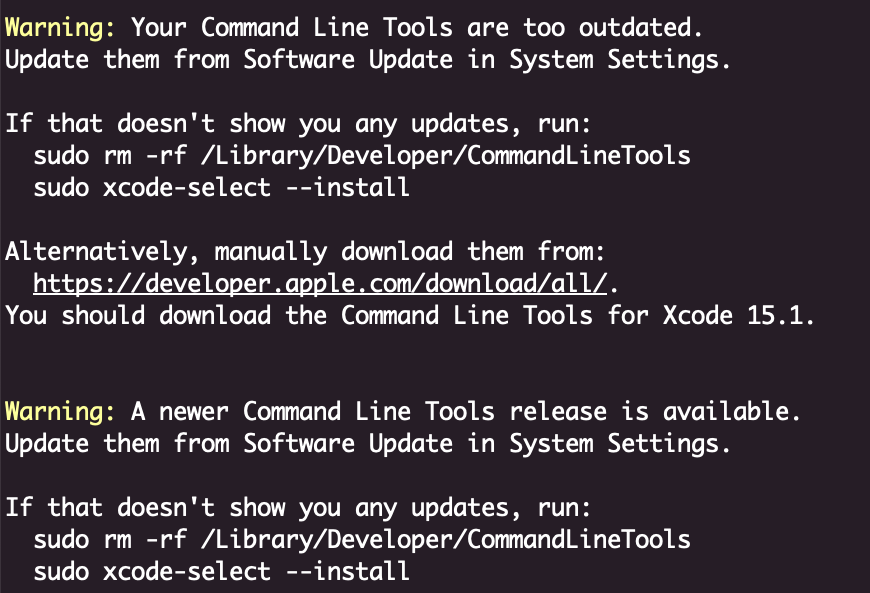
This is weird because I had previously checked for an update after an OS update, and I had tried to re-install the tools just to be safe.
In both cases, it said, “there are no updates, go away”.
Anywho, I run the following:
sudo rm -rf /Library/Developer/CommandLineTools
sudo xcode-select --install
Eventually, notice the popup window (because why install them from the terminal), click OK to continue, and 10 minutes or so later, we are back in business.
The key takeaways:
- This shit isn’t hard, it just takes patience.
- Even those who have done it for a long time still get stuck.
- There is nothing wrong with yelling profanities at a computer from the comfort of your basement.
Finding Joy in Fitness: The Importance of Enjoying Your Training
Last week’s early morning gym commutes were far from ideal. One morning, I attempted to leave and discovered I had a dead battery (actually, two dead batteries). Two days later, I had a close encounter with a deer while driving. Temperatures were in the low 30s at best.
However, at approximately 4:35 am on a Monday (today), I found myself not only commuting to the gym again but also feeling quite excited to get to work. It struck me then that it all comes down to finding the type of training you genuinely enjoy. While there may be exercises considered “the best” or “better,” even engaging in the most mediocre exercise is far better for you than doing nothing.
This wasn’t always the case for me. It took some trial and error, along with the willingness to start something, fully commit to it, and then be open to finding something that I both enjoyed and that yielded better results.
Ultimately, what truly matters is taking that initial step and sticking with it. It is crucial to listen to your body and determine what it will take to enjoy the work.
Charlie Munge:
The world isn’t driven by greed. It’s driven by envy.
Ruby Enumerable#any?
At first glance, this is not what I was expecting:
[false, false, false].any? => false
But a quick glance at the docs:
The method returns true if the block ever returns a value other than false or nil
This can be handy for doing a bunch of small tests and detecting if anything passed.
Looks interesting. I will definitely try it out once they support Ruby.
Who’s Harry Potter? Making LLMs forget
What do we do if we realize that some of our training data needs to be removed after the LLM has already been trained?
In a similar vein to the Bill Gurley’s video, Malcom Gladwell had a recent podcast highlighting the misinformation in bills that would ban AR-15’s.
A truly fantastic talk by Bill Gurley on the regulatory landscape and the influence of special interests - 2,851 Miles